
Unblur Image Online Free with AI
Fix blurry photos, sharpen soft details, and make your images clearer in seconds.
Unblur Image — Make a Blurry Photo Clearer
Upload a JPG, PNG, or WebP image to reduce blur and preview a sharper result before you download it.
Upload Image
Add up to 5 images at once.
Click to upload image or drag image here
Supports JPG, PNG, WEBP, ZIP formats, max 20.00MB each
You can select or drag up to 5 images.
Upload files or paste
Try an example image
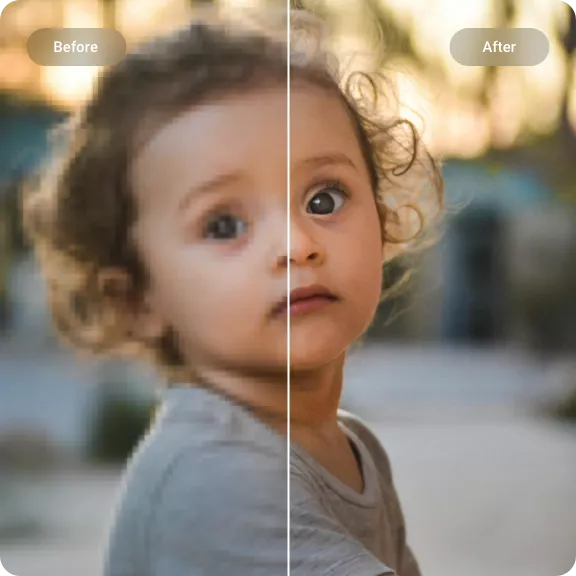
Unblur Image Online with AI — Make Blurry Photos Clearer
Upscayl AI analyzes soft edges and lost clarity to create a cleaner image. Results are strongest for mild to moderate blur, soft focus, and compression softness — common causes of a blurry-looking photo.
Unblur Portraits and Faces
Improve soft portraits, headshots, and group photos with more defined eyes, hair, and facial edges while keeping the result natural.
- Sharper facial features
- Natural-looking detail
- Reduced softness
Make Text and Screenshots Clearer
Clean up mildly blurry screenshots, scanned pages, and photos of text so small characters and edges are easier to inspect.
- Sharper character edges
- Cleaner screenshots
- Better archive readability
Improve Old and Product Photos
Recover visible sharpness in old digital photos, compressed downloads, and product images that look soft at listing or social-media sizes.
- Less compression softness
- Cleaner product edges
- Browser-based workflow
How to Unblur an Image Online with AI
Three simple steps to make a blurry photo clearer.
1. Upload Your Photo
Choose a JPG, PNG, or WebP image with blur, soft focus, or reduced clarity.
2. Let AI Reduce the Blur
AI analyzes edges and image detail, then applies sharpening and clarity improvements in a single pass.
3. Preview and Download
Compare the result with the original and download the clearer image once it looks right.
Unblur Image Features for Blurry Photos
One focused workflow for blurry portraits, screenshots, old photos, and product images.
Blur and Softness Reduction
AI identifies softened edges and improves local clarity for soft focus, mild blur, and compression softness without requiring manual sharpening settings.
Portrait Detail Recovery
Portraits and headshots gain more definition around eyes, hair, and facial contours while retaining a natural look.
Clearer Text and Screenshots
Light softness around letters and interface elements is reduced so screenshots and documents are easier to read.
Old Photo Cleanup
Visible sharpness in scanned prints and older digital photos improves without claiming to recreate detail that was never captured.
Product Image Sharpening
Soft edges and compression artifacts in product photos are cleaned up for stores, catalogs, and social posts.
Works in Your Browser
Upload, process, preview, and download from a modern desktop or mobile browser.
Make a Blurry Photo Clearer
Upload an image and see what AI blur reduction can improve.
Unblur Your ImageExplore other tools
Unblur Image Online — FAQ
Common questions about removing blur and sharpening blurry photos with AI.
What does an AI photo deblurring tool do?
It analyzes a blurry or soft image and improves visible edge definition, clarity, and sharpness. It cannot recover detail that was never captured in the original.
Can it fix every blurry photo?
Results depend on the source. Mild to moderate blur, soft focus, and compression softness usually respond better than severe motion blur or a completely out-of-focus image.
Can I unblur a photo online for free?
New accounts receive trial credits to test the tool. Processing uses credits according to the current account rules shown in the app.
Do I need to sign up?
An account is needed to process images and download results. Your account also keeps your generated images and remaining credits available.
What formats are supported?
You can upload JPG, JPEG, PNG, and WebP images. The available download format is shown with the generated result.
Can it unblur text or screenshots?
It can improve mild softness around text and interface elements, although tiny or heavily blurred characters may remain unreadable.
Can I use it on my phone?
Yes. The page works in modern mobile browsers, including Safari and Chrome on iOS and Android.