
Upscale Low-Resolution Images
Create a larger image from a small source without relying on basic pixel stretching alone.
Upload a low-resolution image, choose an upscale size, and preview the enlarged result before downloading it.
Upload Image
Add up to 5 images at once.
Click to upload image or drag image here
Supports JPG, PNG, WEBP, ZIP formats, max 20.00MB each
You can select or drag up to 5 images.
Upload files or paste
Try an example image
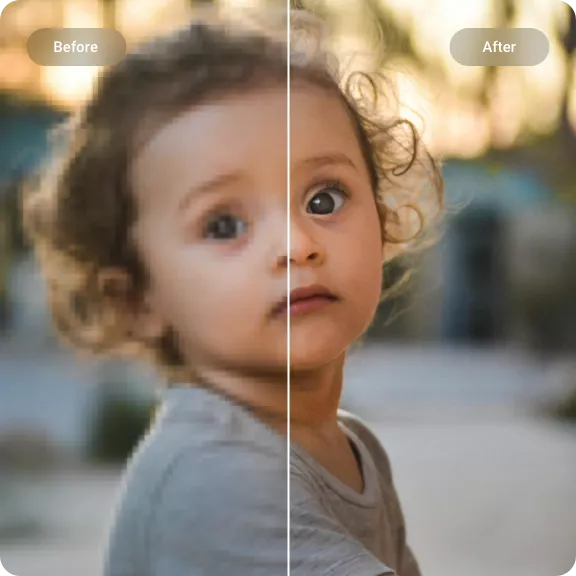
AI upscaling for real-world images
Real-ESRGAN is an AI super-resolution model that enlarges low-resolution images while improving common blur, noise, and compression artifacts.
Read the official Real-ESRGAN projectCreate a larger image from a small source without relying on basic pixel stretching alone.
Process everyday images where soft detail, digital noise, and JPEG compression may appear together.
Generate clearer-looking edges and textures while keeping the original subject and composition in place.
Upscale an image in three steps
Upload the best source available, select an output size, then preview the enhanced image before saving it.
Choose a JPG, PNG, or WebP from your device, paste an image URL, or add a supported group of files.
Select Standard mode, set the enlargement size and output format, then start the upscale.
Check faces, text, fine lines, and repeating textures at full size before downloading the result.
Simple online image upscaling
Use Real-ESRGAN through a browser-based workspace with practical controls for single images and batches.
Upscale an image online without downloading model files or setting up a command-line environment.
Choose the enlargement size and file format that fit your website, product listing, presentation, or creative project.
Add multiple images to one session when a project contains a set of product photos, graphics, or related assets.
Inspect the enlarged result for distorted text, faces, edges, or textures before using it in your project.
Popular ways to enlarge an image
Use Real-ESRGAN when a photo or graphic is too small, soft, or compressed for its next placement.
Enlarge small digital photos and scans for modern screens, albums, presentations, or personal archives.
Prepare product photos for larger ecommerce listings, storefront banners, and marketing layouts.
Resize thumbnails, posts, profile images, and promotional graphics for larger social media placements.
Increase the resolution of AI-generated artwork before using it on a website, in a presentation, or in a design project.
Pick the tool for the flaw
Resolution is one part of image quality; switch tools when clarity, blur, or illustrated linework is the main concern.
Work on the overall appearance of a photo when color, contrast, and visible detail need attention together.
Improve overall qualityTarget soft-looking edges in a file that already has enough width and height for its intended placement.
Refine soft edgesUse an artwork-focused workflow for cel shading, manga panels, character art, and other illustrated sources.
Enlarge illustrated artKnow what to expect
Useful details about source quality, output settings, reconstructed pixels, portraits, and multi-image jobs.
Real-ESRGAN was created for practical image restoration and super-resolution. It generates a larger raster image from a low-quality source while accounting for common real-world degradation.
Check any detail that must stay exact: faces, small type, logos, railings, fabric, foliage, and repeated patterns. These areas make model-generated changes easier to notice.
You can begin with JPG, PNG, or WebP files. A cleaner, less compressed source usually gives the model more reliable visual information to work from.
No. Information missing from the source cannot be retrieved. Super-resolution predicts plausible pixels, so the new detail may not match what existed in the original scene.
You can process a portrait in Standard mode, but inspect eyes, hair, teeth, and skin at full size. The workspace also offers a Portrait mode for face-focused work.
Conventional resizing calculates a bigger grid from existing pixels. Real-ESRGAN uses a trained neural network to predict additional visual structure for the enlarged output.
Yes. The uploader can queue individual files or a supported batch. Review the displayed file and credit limits before processing a larger set.
Load the source, choose its new size, and examine the generated detail before saving your file.
Start Real-ESRGAN Upscaling