
Upscale Media — Free AI Image Upscaler Online
Enlarge photos, product shots, and artwork 2x, 4x, or 8x — right in your browser.
Upload an Image to Upscale
Upload a JPG, PNG, or WebP file and download a sharper high-resolution result in seconds.
Upload Image
Add up to 5 images at once.
Click to upload image or drag image here
Supports JPG, PNG, WEBP, ZIP formats, max 20.00MB each
You can select or drag up to 5 images.
Upload files or paste
Try an example image
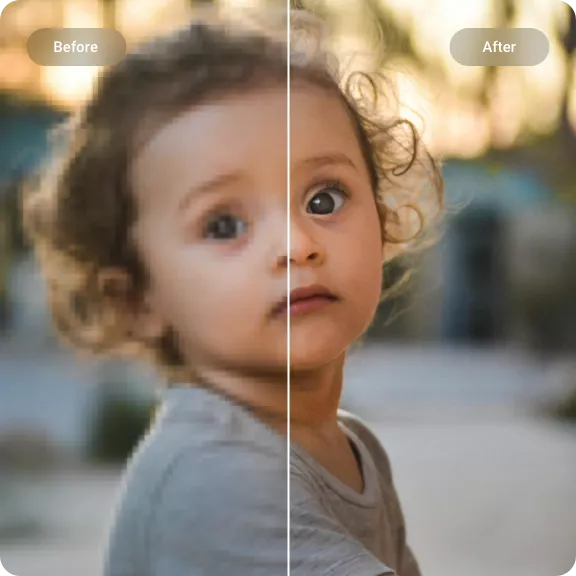
Upscale Media — Bigger Images That Stay Sharp
AI upscaling reconstructs edges, smooths pixelation, and restores fine details so enlarged images stay crisp. Upload once or batch process multiple files at no cost.
Low-Resolution Photo to 4K
Small or compressed photos often look blurry when enlarged. AI upscaling fills in missing detail so old images, phone photos, and downloaded files come out crisp at HD or 4K sizes.
- Higher pixel density
- Less blur on enlargement
- Sharper edges
- Cleaner close-up previews
Product Photos for Ecommerce
Product images that look fine on a phone can appear pixelated on a desktop. Upscale them to keep labels readable, edges crisp, and textures visible in zoom previews.
- Sharper labels
- Cleaner product outlines
- Better zoom previews
- Batch-friendly output
Artwork, Screenshots, and Social Posts
Digital artwork, app screenshots, profile images, and social graphics often lose quality when resized. AI upscaling keeps text readable and lines clean at any output size.
- Crisper UI text
- Cleaner artwork lines
- Reduced pixelation
- Ready for reuse
How to Use Upscale Media
No account needed. No payment required. Just upload, choose your size, and download in seconds.
1. Upload Your Image
Drag and drop a JPG, PNG, or WebP file. You can upload one image or queue multiple at once for batch processing.
2. Pick Your Output Size
Choose 2x, 4x, 6x, or 8x enlargement depending on how large you need the result. Enable face enhancement for portraits and group photos.
3. Download Instantly
No sign-up forms, no watermarks. Preview the result and download the high-resolution image ready for web, print, or social media.
Upscale Media Features
Upscale Media is designed for anyone who needs to enlarge images quickly without spending money or jumping through hoops. No subscriptions, no hidden limits.
AI-Powered Enlargement
Instead of stretching pixels like a basic photo editor, the AI reconstructs edges, textures, and detail so the image stays sharp at 2x, 4x, 6x, or 8x its original size.
Flexible Output Sizes
Choose exactly how large you need the result — 2x for quick web use, 4x for HD quality, 6x or 8x for print-ready resolution.
Batch Processing
Upload and upscale multiple images in one go. Consistent quality across a set of product shots, social media assets, or archive photos.
Face Enhancement for Portraits
Optional face-aware processing that sharpens eyes and facial features in portraits and group photos without introducing an artificial look.
Wide Format Compatibility
Works with JPG, JPEG, PNG, and WebP files directly. No need to convert formats or resize before uploading.
Free with No Sign-Up
Upload an image, choose your settings, and download the result. No credit card, no trial period, no watermark on your downloads.
Ready to try Upscale Media?
Upload a photo or artwork and get a cleaner high-resolution result in seconds.
Upscale Image FreeExplore other tools
Upscale Media — FAQ
Quick answers about using AI to upscale images online for free.
What is Upscale Media?
It's a free online AI image upscaler. Upload a photo, choose an output size, and the AI enlarges it while keeping edges sharp and detail intact — no subscription or sign-up needed.
Is there a catch — what's the free limit?
No catch. You can upload and upscale images without paying. There's no trial timer, no credit card required, and no watermark added to your downloads.
How large can I upscale an image?
You can choose from 2x, 4x, 6x, or 8x enlargement. Higher multipliers produce the best results when the source image has good visible structure to work with.
Do you keep my uploaded images?
Uploaded images are processed temporarily and not stored longer than needed. We do not train on your images or share them with outside services.