
Magnific AI Upscaler — Creative Upscaling Online
Enlarge your images while recovering detail, texture, and sharpness.
Upload an Image for Creative Upscaling
Upload an image and let Magnific AI enlarge it while recovering natural-looking detail and sharpness.
Upload Image
Add up to 5 images at once.
Click to upload image or drag image here
Supports JPG, PNG, WEBP, ZIP formats, max 20.00MB each
You can select or drag up to 5 images.
Upload files or paste
Try an example image
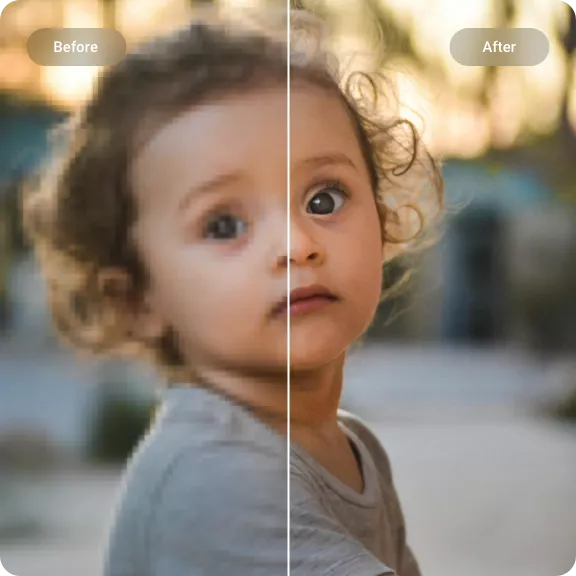
Magnific AI Upscaling Results — More Detail, Same Image
Good creative upscaling rebuilds what gets lost during enlargement — texture, edge definition, facial detail — without inventing new content or altering the composition.
AI Art and Midjourney Upscaling
Generated images often lose fine detail during creation. With Magnific AI you can recover sharper lines, richer surfaces, and cleaner edges — ideal for portfolios, large prints, and close-up crops.
- Sharper line work
- Richer surface detail
- Cleaner large-format output
- Better print preparation
Portrait Detail Recovery
Soft or low-resolution portraits benefit from face-aware enhancement. The upscaler sharpens eyes, hair, and skin texture while keeping facial features natural and recognizable.
- Face recovery
- Hair and eye detail
- Reduced softness
- Natural skin texture
Product and Texture Upscaling
Product photos, packaging shots, and material close-ups need clear edges and readable textures at larger sizes. Magnific AI recovers that detail without making surfaces look artificial.
- Sharper product edges
- Cleaner material texture
- Better ecommerce crops
- Marketing-ready output
How to Use Magnific AI Upscaler
Magnific AI focuses on creative detail recovery — the process is designed for users who care about artistic quality, not just size.
1. Upload Your Source Image
Start with AI-generated art, a portrait, a product photo, or any image where you want to recover fine detail. JPG, PNG, and WebP files are supported.
2. Set Detail Recovery Preferences
Choose your output size and toggle face enhancement if the image contains people. The AI focuses on reconstructing texture and sharpness while keeping the composition intact.
3. Review and Download in 4K
Compare the result with the original side by side. Download the high-resolution version for portfolios, large prints, or commercial projects.
Magnific AI Upscaler Features
This tool is built for creatives who want their images to look better at larger sizes — not just bigger, but sharper, more detailed, and true to the original.
Detail Reconstruction
Missing or soft details in low-resolution images are rebuilt by the AI, not just sharpened. The result is genuine-looking texture rather than an artificially crisp filter.
Resemblance-Aware Processing
The upscaler preserves the original composition, colors, and artistic intent. Fine details are enhanced, not replaced, so the result stays faithful to your source image.
AI Art Upscaling
Images from Midjourney, DALL·E, and Stable Diffusion are handled with care. The AI preserves the fine lines, gradients, and painterly textures that make generated artwork look natural.
Texture and Surface Recovery
Fabric grain, skin texture, foliage, and surfaces are rebuilt at larger sizes. The output looks like a detailed photograph, not a smooth digital render.
Portrait Enhancement Mode
Face-aware processing sharpens eyes, hair, and facial features without making skin look waxy. Ideal for portraits, headshots, and group photos from compressed sources.
Browser-Based Creative Studio
Upload, adjust, and download — all in your browser. No need to install desktop software or navigate complex editing pipelines to get professional results.
Ready to try Magnific AI Upscaler?
Upload an image and see what creative upscaling can do for your artwork, portraits, and product photos.
Upscale Your ImageExplore other tools
Magnific AI Upscaler — FAQ
Common questions about creative AI upscaling, detail recovery, and image enlargement.
What is Magnific AI Upscaler?
It's a creative AI upscaling tool that enlarges images while recovering texture, sharpness, and fine detail — instead of just stretching pixels like a normal resize.
How is creative upscaling different from regular upscaling?
Regular upscaling stretches existing pixels, which causes blur and lost detail. Creative upscaling uses AI to reconstruct missing surface texture, sharpen natural edges, and recover fine details that would otherwise be lost.
Can I upscale AI-generated art from Midjourney or Stable Diffusion?
Yes. Generated images often look soft or lose fine detail. Magnific AI recovers sharper lines, richer surface detail, and cleaner edges — making them suitable for portfolios, prints, and large displays.
Will the upscaled image still look like the original?
Yes — the goal is enhancement, not replacement. The AI recovers missing detail while preserving the original composition, colors, and artistic intent, so the output stays faithful to your source.