
VanceAI Image Upscaler — Anime, Photo & Product Upscaling
One tool that adapts to anime art, photographs, product shots, and illustrations.
Upload an Image to Upscale
Upload a photo, anime, product image, or illustration and let AI enlarge it while preserving clean edges and natural detail.
Upload Image
Add up to 5 images at once.
Click to upload image or drag image here
Supports JPG, PNG, WEBP, ZIP formats, max 20.00MB each
You can select or drag up to 5 images.
Upload files or paste
Try an example image
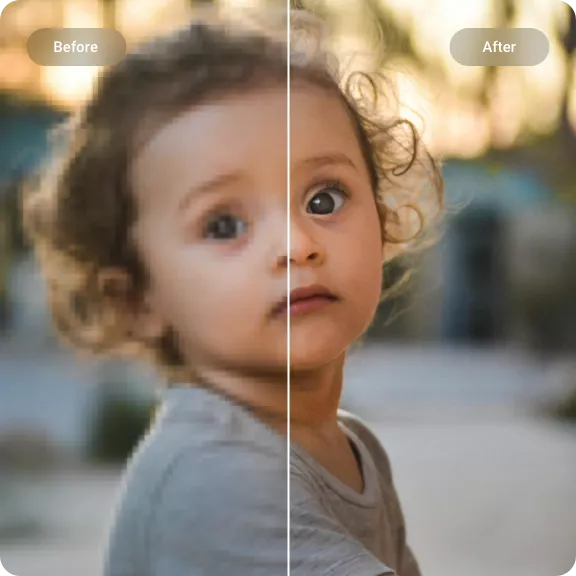
VanceAI Image Upscaling — Adapts to Anime, Photos, and Products
Different image types need different treatment. This upscaler preserves clean lines in anime, sharpens realistic detail in photos, and keeps product textures readable — all in one tool.
Anime and Illustration Upscaling
Anime, manga, and digital illustrations use clean lines and flat color areas — standard upscalers often blur these boundaries. VanceAI preserves line sharpness and keeps color zones smooth without introducing artifacts.
- Cleaner line art
- Reduced blockiness
- Crisper wallpapers
- Artwork-friendly output
Product Image Enhancement
Product photos need readable labels, visible material texture, and sharp edges — especially at zoom levels. AI upscaling targets these details without making surfaces look artificial.
- Sharper labels
- Cleaner outlines
- Better material texture
- Listing-ready downloads
Photo Enlargement to HD or 4K
Everyday photos, old images, and portraits can be enlarged to HD or 4K quality. Optional face enhancement helps recover sharpness in soft or compressed portraits.
- HD and 4K-ready output
- Optional face enhancement
- Less blur
- Print and presentation use
How to Use VanceAI Image Upscaler
VanceAI automatically detects your image type and applies the right AI model — no manual tweaking needed.
1. Upload Any Image Type
Drop in a photo, anime image, product shot, illustration, or screenshot. The AI analyzes the content and selects the optimal enhancement model for that type.
2. Choose the Enlargement Level
Select 2x, 4x, or 8x. Enable face enhancement for portraits. No need to manually select between anime and photo modes — the AI handles it automatically.
3. Preview and Save
Review the upscaled result and download it for ecommerce listings, print projects, social media, or personal use. The output is optimized for your specific image type.
VanceAI Image Upscaler Features
This tool is built for users who work with different kinds of visuals — anime art, product catalogs, personal photos — and want an upscaler that treats each type appropriately, not with a one-size-fits-all approach.
Photo Upscaling with Detail Preservation
Enlarge photos while keeping skin texture natural, edges sharp, and fine details intact. The AI handles the complexity of photographic content — gradients, highlights, and depth.
Product Image Optimization
Product photos need more than just enlargement — they need clear labels, visible material grain, and sharp packaging edges. The AI prioritizes these details without over-processing.
Anime and Manga Line Art Mode
Unlike photo upscalers that blur lines, VanceAI preserves the crisp edges and smooth color fills that define anime-style art. Reduces blocky compression artifacts common in digital illustrations.
Print-Ready Output
Upscaled images are prepared for real-world formats: posters, catalogs, slides, and large displays. Suitable for both digital presentation and physical printing.
Compression and Blur Cleanup
Low-resolution sources, compressed web images, and older digital photos are cleaned up in one pass. The AI reduces pixelation and softness while keeping the original content recognizable.
Online Workflow, No Installation
No software to install, no complex settings to learn. Upload an image, choose your size, and download — the AI handles the rest based on your image type.
Ready to try VanceAI Image Upscaler?
Upload a photo, anime art, or product image and get a cleaner high-resolution result.
Upscale Your ImageExplore other tools
VanceAI Image Upscaler — FAQ
Common questions about using AI to upscale anime, photos, and product images.
What is VanceAI Image Upscaler?
It's an AI upscaling tool designed to handle multiple image types — photos, anime, product shots, and illustrations. The AI adapts to each type for cleaner, sharper results.
Can it upscale anime without ruining the line art?
Yes. The AI is trained to recognize and preserve clean lines and smooth color fills in anime, manga, and illustrations. Blocky compression artifacts are reduced without blurring edges.
How does it handle product photos differently?
Product images are processed with emphasis on label readability, edge sharpness, and surface texture. The goal is to make zoom previews look cleaner without adding artificial smoothness.
Do I need to select a mode for each image type?
No. The AI automatically analyzes your image and applies the appropriate enhancement. Just upload and choose your output size — no manual mode switching required.